/
Files and directory structure
Files and directory structure
- Basara
Owned by Basara
Aug 22, 2017
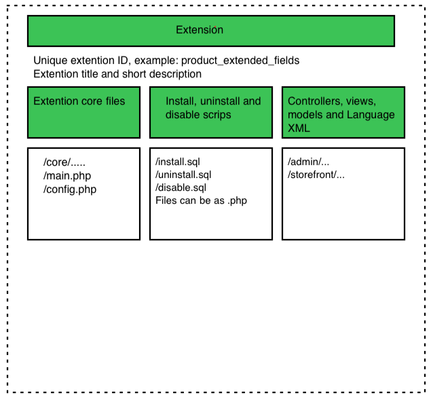
All Extensions are located in extensions folder. Bellow is the set of files and directories that represent one extension.
extensions - All Extensions are located in extensions folder.
Note: you can use PHP or SQL or mixed depending on the requirements.
Pre-install actions - validation
Extensions are installed in control panel from Extension Manager section. Before installation there following checks are performed:
- check available space
- is extensions directory writable
- was extension already installed ( extension upgrade )
- does extension support used core version
- does hosting support all php modules used by extension
- does extension override some controllers/ template files that already overridden by another extension. if two or more extensions override completely same files there will be a conflict, so high priority extension will be used. But, there will be warning in the install about conflict.
Post-install actions
- check all files list and sizes
- run install process
, multiple selections available,
Related content
Architecture Overview
Architecture Overview
Read with this
Templates Overview
Templates Overview
Read with this
Template development guide
Template development guide
Read with this
List Extensions
List Extensions
More like this
Install Extension
Install Extension
More like this
Localhost Installation
Localhost Installation
More like this